Windows ke liye · Free · Private
Bolo aur Likho.
Jo dil mein hai, bol do — likha hua mil jayega.
Free, private, Hinglish-native voice dictation for Windows. Hold a hotkey, speak — clean text har app mein appear ho jaaye.
- Free forever
- Private & offline
- No sign-up
- Open on GitHub
Kaise chalta hai
Bolo — aur text khud aa jaaye.
Hold Ctrl + Win, speak, release. LikhiBoli listens, polishes the mess, and drops clean text right where your cursor is — any Windows app.
Hold Ctrl + Win and speak — it listens.
Let go — it types clean text for you.
Sochte ho Hindi mein… type karte ho English mein… aur baat kahin kho jaati hai. Ab bas bolo — LikhiBoli likh dega.
Hamesha ready
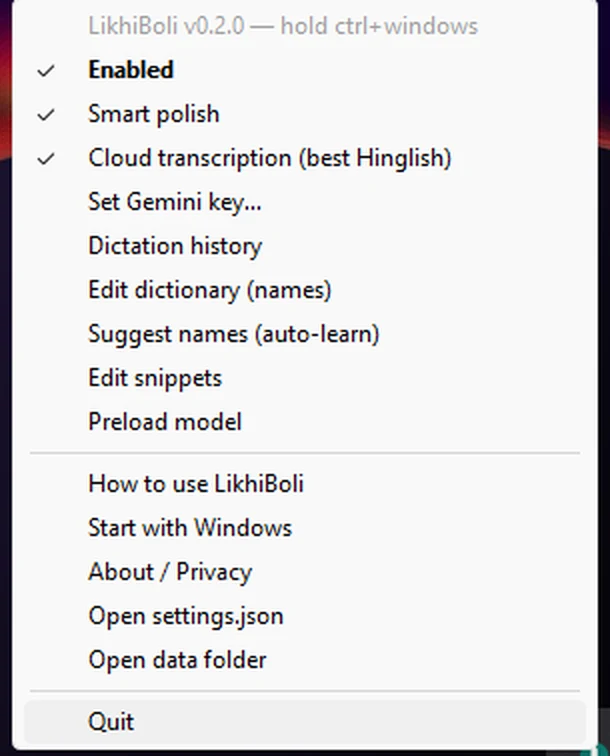
Lives quietly in your tray.
No window to keep open, no tab to manage. LikhiBoli waits in your Windows system tray — one click to switch between offline and online modes, set your Gemini key, browse your dictation history, or teach it new names.
- Toggle Smart polish and Cloud transcription anytime
- Runs on Ctrl + Win from any app — nothing to switch to
- Starts with Windows, sits idle at ~300 MB RAM
Kya kya karta hai
What it does
-
Works everywhere
One hotkey in any Windows app: chat, email, code editors, browsers.
-
Hinglish-native
Handles Hindi, English, and mid-sentence switching — typed out in easy Roman Hinglish, the way you actually chat.
-
Smart polish
"umm", "you know" — gone. Punctuation, capitalization, and corrections ("5 baje… no, 6 baje") handled automatically.
-
Personal dictionary & snippets
Learns your recurring names and terms. Say "my sign-off" and your saved signature appears.
-
Context aware
Detects whether you're in code, chat, or email, and adapts the tone.
-
Voice commands
End with "send it" to type + press Enter, or "scratch that" to cancel.
Aapki awaaz, aapki machine
Your voice never becomes someone's data.
Offline mode: speech is transcribed on your PC. Audio never leaves your machine. Works without internet.
Online mode (optional): audio goes only to Google Gemini using your own free key — passed through in memory, never stored by LikhiBoli or any server.
No accounts. No login. No telemetry. No LikhiBoli server. Your dictation history lives in a local file on your device, searchable by you alone.
Do mode, aapki marzi
Offline vs Online
| Aspect | Offline · Local | Online · Gemini |
|---|---|---|
| Accuracy | Good English | Best Hindi / Hinglish |
| Internet | Not needed (after one-time ~460 MB model download) | Needed |
| Setup | Nothing | Free Gemini API key (2 minutes) |
| Privacy | Audio never leaves your PC | Your own key, nothing stored |
Getting your free Gemini key · about 2 minutes
-
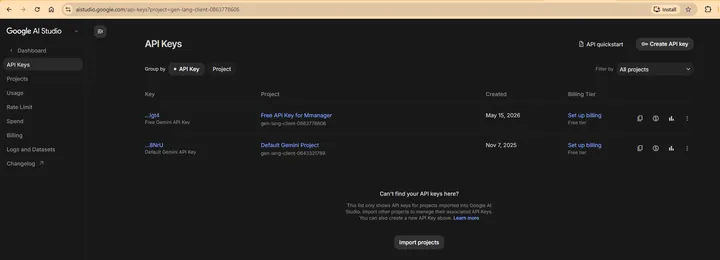
1 Open aistudio.google.com/apikey and sign in with Google.
-
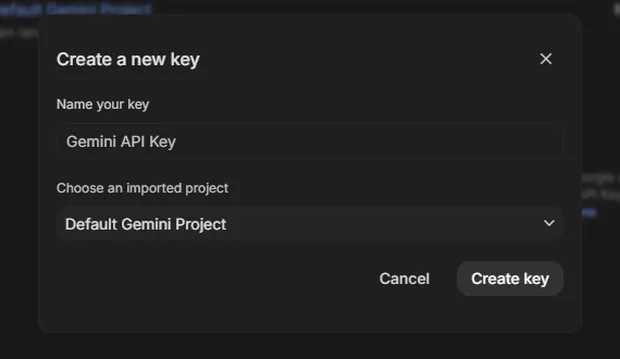
2 Click Create API key and pick a project.
-
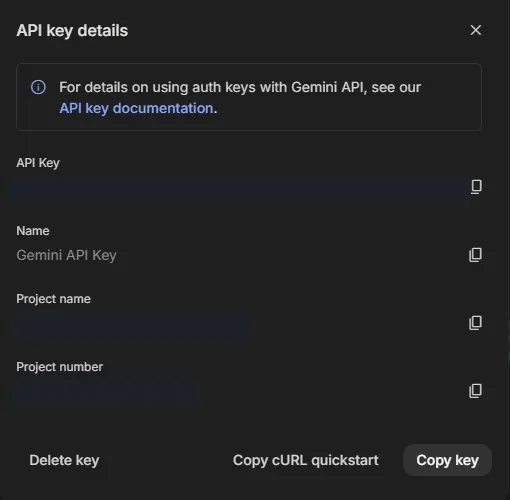
3 Copy your new key with Copy key.
-
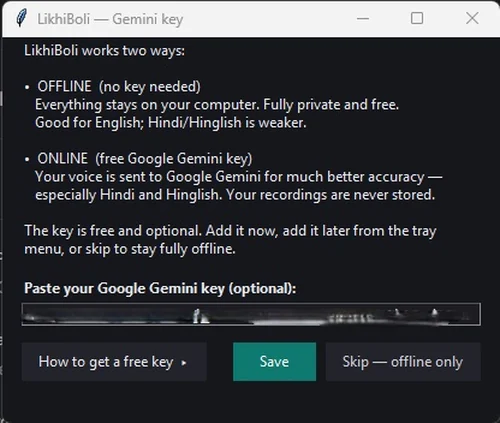
4 Paste it into LikhiBoli (tray → Set Gemini key) and Save.
Windows 10/11 (64-bit) · Any modern CPU · ~300 MB RAM idle · Microphone · Internet for first-time model download or online mode
Sawaal jawaab
FAQ
Is it really free?
Yes. No trial, no subscription, no locked features. If it saves you time, you can support development over UPI.
Why does Windows show a warning?
Because the installer isn't code-signed — certificates cost ₹15–40k/year. This is normal for free indie software. Click "More info → Run anyway" once — you'll never see it again.
Is my voice recorded or stored?
No. Audio is deleted after transcription. In offline mode it never leaves your PC; in online mode it passes through Google Gemini with your own key and is never stored by LikhiBoli.
Do I need internet?
Only twice: once to download the ~460 MB offline speech model on first use, and whenever you choose online Hinglish mode. Offline English works with no internet at all.
Does it work in Hindi?
Yes — that's the point. Speak in Hindi or Hinglish and LikhiBoli types it in easy Roman letters — the way you chat. Online mode gives the best Hindi/Hinglish accuracy.
Which apps does it work in?
All of them. Anywhere you can type in Windows, LikhiBoli can type for you.
Mac / Android?
Windows only today. An Android app is planned.
Support
LikhiBoli free hai — aur free rahega.
No ads, no subscription, no locked features. Your support funds the Android app, better Hinglish accuracy, and keeps LikhiBoli free and private for everyone. Any amount over UPI — whatever feels right.